NADRA PakID App: 7 Essential Reasons Every Pakistani Must Know About It
NADRA PakID app helps Pakistanis verify identity, check family details, and manage CNIC records securely from any smartphone.
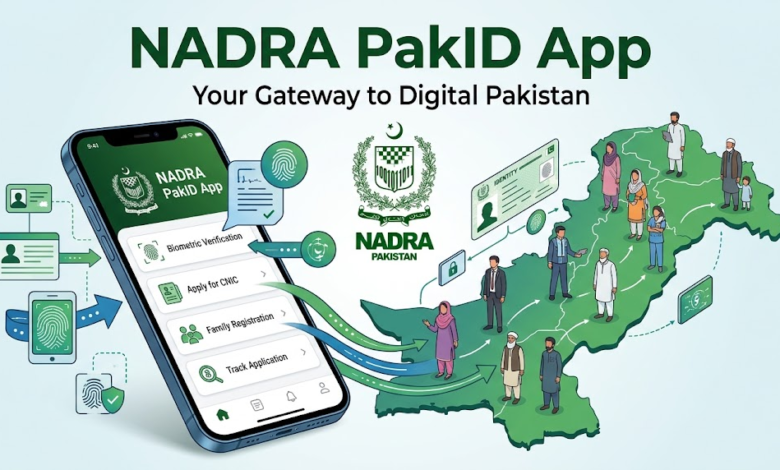
NADRA PakID app has quietly become one of the most useful government tools available to Pakistani citizens today, yet a surprising number of people still don’t know it exists. Developed by the National Database and Registration Authority, this mobile application puts identity verification, family registration data, and CNIC-related services directly on your phone. No more standing in long queues at a NADRA office just to confirm a family member’s ID number or check the status of a new card application.
For decades, dealing with NADRA meant physical visits, paper forms, and hours of waiting. The NADRA PakID app changes that equation. Whether you’re a student who needs to verify a guardian’s CNIC, a landlord confirming a tenant’s identity, or someone simply trying to check their family tree as registered with the government, this app handles it in minutes.
This article walks through what the app actually does, how to set it up, why it matters for ordinary citizens, and what to watch out for when using it. If you’re a Pakistani citizen who hasn’t yet explored this tool, or you’re trying to understand whether it’s worth your time, this guide covers everything you need before you download it.
What Is the NADRA PakID App?
The NADRA PakID app is an official mobile application launched by Pakistan’s National Database and Registration Authority to let citizens access identity-related services digitally. It’s built as a companion to NADRA’s existing verification systems (like the 8300 SMS service) but wrapped in a more user-friendly, feature-rich mobile experience.
At its core, the app serves three main purposes:
- Verifying identity details linked to a Computerized National Identity Card (CNIC)
- Displaying family registration records as they exist in NADRA’s database
- Offering supporting services such as birth certificate details, marriage registration status, and other civil documentation
Unlike older SMS-based verification methods that only returned bare-bones text results, the PakID app presents this information in a clean, organized interface. You can view a person’s registered family members, their relationship to the head of family, and other details that used to require an in-person visit or a formal request letter.
It’s worth noting that NADRA has, over the years, released a few different apps and portals (including NADRA e-Sahulat and the Pak Identity app), so it helps to confirm you’re downloading the correct, verified version from an official source such as the NADRA official website before installing anything from a third-party app store listing.
Key Features of the NADRA PakID App
The app isn’t just a digital ID card viewer. It bundles together a handful of features that used to be scattered across different offices, phone lines, and paperwork.
1. Instant CNIC Verification
One of the most used functions is instant CNIC verification. Enter a CNIC number, and the app pulls up basic registered details, confirming whether the number is valid and active. This is particularly handy for:


- Employers verifying a new hire’s identity
- Landlords confirming a tenant before signing a lease
- Anyone double-checking a CNIC number before submitting it on an official form
2. Family Registration Certificate (FRC) Details
The app allows users to view their family registration details, showing everyone listed under the same family record. This includes names, CNIC numbers (where applicable), and relationships. It’s a feature many people only discover they need when applying for a passport, a visa, or a school admission that requires proof of family relationship.
3. Child Registration Certificate (CRC) and B-Form Status
Parents can check the registration status of their children’s B-Form (Child Registration Certificate) directly through the app rather than calling a helpline or visiting a NADRA Registration Centre.
4. Marriage Registration Certificate (MRC) Lookup
For those who need to confirm marriage registration records, whether for legal, immigration, or personal reasons, this feature saves a trip to the local Union Council office.
5. Death Registration Records
Similarly, death registration details can be checked through the app, which matters for inheritance cases, pension claims, and legal estate matters.
6. Application Tracking
If you’ve recently applied for a new CNIC, a renewal, or a modification, the app lets you track the application status using your tracking ID, so you know exactly when to expect your card.
7. Locating the Nearest NADRA Office
The app also includes a locator tool that shows the nearest NADRA Registration Centre (NRC) or Executive Registrar office, along with contact details, which is genuinely useful in cities where office locations aren’t always obvious.
How to Download and Register on the NADRA PakID App
Getting started with the NADRA PakID app is straightforward, but a few steps matter if you want to avoid registration issues later.
- Download from an official source. Search for the app on the Google Play Store or Apple App Store, and confirm the developer is listed as NADRA or an authorized government entity before installing.
- Register with your CNIC number. You’ll be asked to enter your CNIC number along with your registered mobile number (the one on file with NADRA).
- Verify via OTP. A one-time password is sent to your registered mobile number to confirm your identity.
- Set up a PIN or biometric lock. Given the sensitivity of the data involved, the app usually prompts you to secure your account with a PIN, fingerprint, or face recognition.
- Browse available services. Once verified, the home screen typically displays the main service categories: CNIC verification, family details, application tracking, and document status checks.
- Update your mobile number if needed. If your registered number has changed, you may need to visit a NADRA office once to update it before the app can verify you.
If you run into registration trouble, it’s usually because the mobile number on file with NADRA doesn’t match the one you’re using to sign up. That mismatch is the single most common reason people get stuck at the OTP step.
Why Every Pakistani Should Use the NADRA PakID App
There’s a fair question here: is this app actually necessary, or just a convenience for tech-savvy users? A few practical reasons make it worth having on your phone regardless of how often you interact with NADRA.
Saves Time on Routine Verification
Instead of a half-day trip to a registration centre for something as simple as confirming a family member’s CNIC status, the Pak ID app handles it in seconds. For people living in rural areas far from a NADRA office, this alone is a significant improvement.
Reduces Dependence on Middlemen
In the past, some people relied on local “agents” to handle NADRA paperwork, sometimes at an extra, informal cost. Direct access through the app reduces the need for that, putting the process back in the citizen’s hands.
Useful for Overseas Pakistanis
Pakistanis living abroad often need to verify family documents for visa sponsorships, inheritance matters, or NICOP-related processes. The app allows them to check certain records without asking a relative back home to visit a NADRA office on their behalf.
Supports Legal and Financial Processes
Banks, courts, and government departments increasingly ask for CNIC or family verification as part of standard procedure. Having quick, official access to this data through the NADRA Pak ID app simplifies tasks like opening a bank account, applying for a loan, or handling a property transfer.
Improves Transparency
Because the data comes directly from NADRA’s own database, there’s less room for the kind of manual error or fraud that can creep in when verification is handled informally or through unofficial channels.
NADRA Pak ID App vs Traditional NADRA Office Visits
It helps to see the difference side by side.
| Task | Traditional Method | NADRA Pak ID App |
|---|---|---|
| CNIC verification | Visit office or send SMS to 8300 | Instant, in-app lookup |
| Family record check | Formal request or in-person visit | Available immediately after login |
| Application status | Phone call to helpline or in-person inquiry | Real-time tracking with tracking ID |
| B-Form/CRC status | Visit Union Council or NADRA centre | Checked directly in-app |
| Finding nearest office | Ask around or search online | Built-in locator feature |
This comparison makes it clear why the app has gained traction, particularly among younger, mobile-first users, but also increasingly among older citizens once they see how much time it saves.
Security and Data Privacy on the NADRA Pak ID App
Given that the app deals with sensitive national identity data, security is a legitimate concern, and it’s one NADRA has addressed with a layered approach.
- PIN and biometric protection: Access typically requires a PIN, fingerprint, or facial recognition, so the data isn’t exposed if your phone is lost or borrowed.
- OTP-based verification: Every registration and sensitive action is tied to a one-time password sent to your registered number, which prevents unauthorized account creation.
- Encrypted data transmission: Information passed between the app and NADRA’s servers is encrypted, in line with standard practices for government identity systems.
- Limited data exposure: The app generally shows only what’s necessary for verification purposes rather than a citizen’s complete record, reducing the risk if a device is compromised.
That said, users should still take basic precautions: never share your OTP with anyone, avoid installing the app from unofficial third-party APK sources, and keep your device’s operating system updated. According to guidance from the Federal Investigation Agency’s Cyber Crime Wing, a large share of digital fraud in Pakistan stems from users unknowingly sharing OTPs or installing fake versions of legitimate apps, so this caution applies well beyond just NADRA services.
Common Issues and Troubleshooting
Even a well-built app runs into friction, and a few recurring problems come up often enough to mention.
OTP Not Received
This usually happens when the mobile number on file with NADRA is outdated or the SIM has been deactivated. The fix is to update your number at a NADRA Registration Centre, after which the app should work normally.
App Shows “Record Not Found”
This can happen with older CNICs that haven’t been digitized fully or if there’s a mismatch between the entered number and NADRA’s records. A visit to a local office to confirm and update your record usually resolves it.
Login Loop or Repeated PIN Requests
Clearing the app cache or reinstalling the app often fixes this. If it persists, it may point to a temporary server-side issue on NADRA’s end rather than a problem with your device.
Slow Performance During Peak Hours
Like most government portals, usage spikes (around tax season, admission deadlines, or CNIC renewal drives) can slow things down. Trying during off-peak hours, early morning or late evening, generally gives a smoother experience.
Tips to Get the Most Out of the NADRA Pak ID App
- Keep your registered mobile number current, since almost every feature depends on it.
- Enable biometric lock rather than relying solely on a PIN, for both speed and security.
- Screenshot or save important verification results if you need them for an application elsewhere, since some processes ask for proof of the check.
- Check for app updates regularly. NADRA periodically adds new features and patches security issues.
- If a feature seems to be missing compared to what’s described online, it may be region-specific or still rolling out. Cross-check with NADRA’s official channels before assuming it’s broken.
Conclusion
The NADRA PakID app brings identity verification, family record checks, application tracking, and civil documentation lookups together in a single, secure mobile tool, cutting down the time and hassle traditionally associated with visiting a NADRA office. From verifying a CNIC in seconds to tracking a new card application or locating the nearest registration centre, the app covers a wide range of everyday needs for Pakistani citizens both at home and abroad. As long as users download it from an official source, keep their registered mobile number updated, and follow basic security practices like protecting their OTP, the app offers a faster, more transparent alternative to the old paperwork-heavy process, making it a genuinely useful addition to any Pakistani citizen’s phone.