ChatPlayground AI Review: Best Multi-Model AI Apps in 2026
ChatPlayground AI Review — compare 40+ AI models in one platform, including ChatGPT, Claude, Gemini, and DeepSeek, without juggling multiple subscriptions.
ChatPlayground AI is one of those tools that makes you wonder why you ever did things the hard way. If you’ve spent any time hopping between ChatGPT, Claude, Gemini, and DeepSeek in separate browser tabs, testing the same prompt over and over to see which model gives you the best answer — you already understand the problem this platform solves.
The idea behind ChatPlayground AI is simple but genuinely powerful: instead of committing to one AI model and hoping for the best, you send a single prompt to multiple models at the same time and compare their responses side by side. It’s less like using a chatbot and more like holding an AI roundtable, where each model brings its own strengths to the table.
This review covers everything you need to know — the features, the pricing, who it’s actually built for, what works well, what doesn’t, and whether it’s worth your money in 2026. We’ll also look at how it stacks up against alternatives and what makes it stand out in an increasingly crowded space.
Whether you’re a content creator, a developer, a prompt engineer, or just someone who uses AI heavily for work, this breakdown will help you decide if ChatPlayground AI belongs in your toolkit.
What Is ChatPlayground AI?
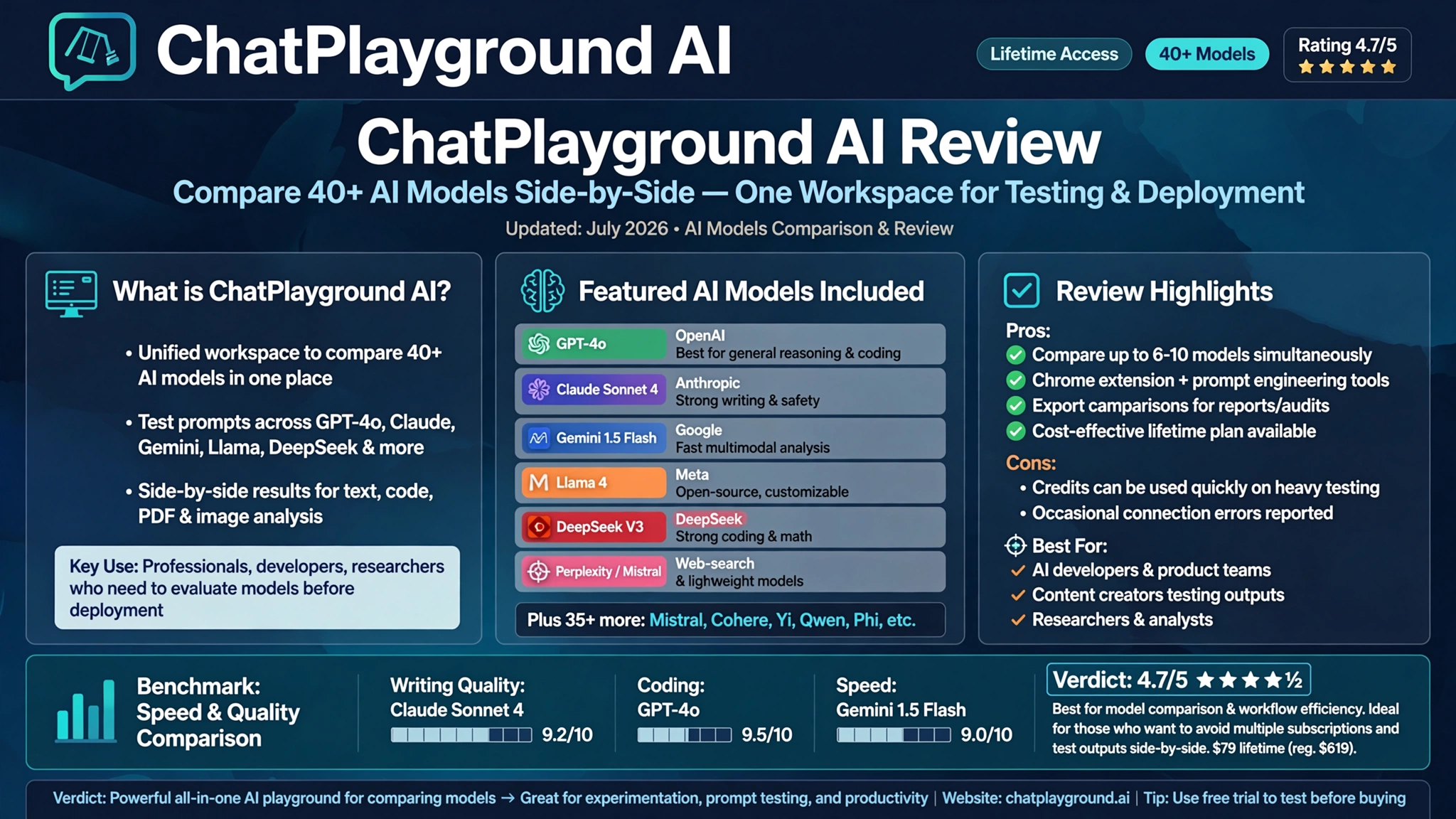
ChatPlayground AI is a multi-model AI platform that gives you access to more than 40 of the world’s leading large language models from a single interface. Instead of subscribing to ChatGPT separately, then Claude, then Gemini — and paying for each one individually — you get them all in one place under one subscription.
The platform was built for people who don’t want to be locked into a single AI model. Because the truth is, no single model wins every task. GPT-4o might write better marketing copy in some cases. Claude Sonnet might handle nuanced analysis more carefully. Gemini might be faster for quick research. DeepSeek might surprise you on technical tasks. ChatPlayground AI lets you find out in real time, without switching tools.
You can try it yourself at ChatPlayground AI.
Key Features of ChatPlayground AI
Side-by-Side AI Model Comparison
This is the headline feature and the reason most people sign up. You enter one prompt, and ChatPlayground AI sends it to multiple models simultaneously. You can run up to six models at the same time and watch their responses stream in side by side.


The practical value here is hard to overstate. When models disagree on something, you immediately notice the nuance. When they all agree, you can trust the answer faster. For tasks where accuracy matters — research, legal summaries, technical documentation — this kind of parallel AI comparison is a genuine workflow upgrade.
Access to 40+ AI Models
The platform supports an extensive roster of large language models, including:
- ChatGPT (GPT-4o)
- Claude Sonnet 4
- Google Gemini 1.5 Pro and Flash
- DeepSeek V3
- Llama (Meta)
- Perplexity
- Mistral
- Grok
- Bing Copilot
The sheer breadth of the AI model library means you’re not just comparing two or three tools — you’re comparing the entire landscape of modern AI, from one window.
Prompt Engineering Tools
ChatPlayground AI includes a built-in prompt engineering toolkit that helps you refine your inputs before sending them out. You can save prompts you’ve tested and liked, adjust parameters, and build a personal prompt library over time.
For teams and prompt engineers who run systematic experiments, this feature alone saves significant time. Instead of keeping prompts in Notion or a Google Doc, everything lives inside the platform where you’ll actually use it.
Chat with PDFs and Images
You can upload documents and images directly into the platform and ask questions about them. Upload a contract, a financial report, a research paper, or a product manual — and the AI models will analyze and summarize the content for you.
The document analysis feature supports both PDFs and images, which makes ChatPlayground AI genuinely useful for professionals dealing with heavy reading loads. Instead of processing documents one model at a time, you can compare how different models interpret the same document.
Real-Time Web Search
Several models in the platform support real-time web search, meaning their answers aren’t limited to their training data. This is particularly useful for questions about recent events, current pricing, new product releases, or anything that requires up-to-date information.
You can toggle web search on or off for each model independently, which gives you control over whether you want a model to stick to its trained knowledge or go fetch fresh data.
AI Image Generation
ChatPlayground AI includes an image generation feature powered by leading AI image models. You can create visuals directly within the platform without switching to Midjourney, DALL-E, or Stable Diffusion separately.
Worth noting: image generation is the weakest part of the platform based on most user feedback. It works, but it’s sensitive to how specific your prompts are. Vague prompts produce inconsistent results. If you specify style, composition, and mood clearly, quality improves noticeably.
Chrome Extension (Web Copilot)
The ChatPlayground AI Chrome extension — called Web Copilot — lets you access AI assistance on any webpage you’re visiting. Highlight text, ask for a summary, get an explanation, or run a quick AI query without leaving the page you’re on.
This is a genuinely useful feature for researchers, writers, and anyone who reads a lot of content online. The extension turns ChatPlayground AI from a destination tool into a constant background assistant.
Saved Chat History
All your conversations are saved and organized so you can pick up where you left off. For ongoing projects — writing, research, coding — this means you’re not starting from scratch every time you open the app.
Who Is ChatPlayground AI Built For?
ChatPlayground AI is best suited for people who already use AI heavily and want to get more out of it. Specifically:
- Content creators and writers who want to compare AI writing styles and pick the best output
- Developers and engineers who need to test how different models handle code, debugging, or technical documentation
- Prompt engineers who run systematic experiments and need a structured environment for testing
- Researchers and analysts who regularly process documents and need multiple interpretations
- Marketing teams who want to generate copy variants and choose the strongest option
- Business professionals who are currently paying for multiple AI subscriptions and want to consolidate
If you’re a casual AI user who just needs one model for occasional tasks, ChatPlayground AI might feel like more than you need. But if AI is a daily part of your workflow, the multi-model comparison approach pays off quickly.
ChatPlayground AI Pricing: Is It Worth It?
Monthly Subscription
ChatPlayground AI offers a monthly subscription starting at around $14.89–$29 per month depending on the plan tier. At that price point, consider what you’re replacing: a ChatGPT Plus subscription runs $20/month, Claude Pro runs $20/month, and Gemini Advanced runs $20/month. If you’re currently paying for two or more of those, the math starts favoring ChatPlayground AI very quickly.
As the platform itself puts it: why pay $20/month for just one AI model when you can get access to ChatGPT, Claude, Gemini, Perplexity, DeepSeek, and more for the same price?
Lifetime Plans
The platform periodically offers lifetime subscription deals through partners like AppSumo and StackSocial. These typically range from $39.99 to $124 as a one-time purchase, depending on the tier and the timing of the deal. The Unlimited Plan has appeared at $59.97 through StackSocial, representing significant long-term savings for heavy users.
If you see a lifetime deal available, it’s worth evaluating seriously — especially if you’re already spending $40+ per month across multiple AI subscriptions.
Free Tier
There is a free tier available, which gives you limited access to the platform to evaluate it before committing to a paid plan. This is a reasonable way to test whether the side-by-side model comparison workflow fits the way you actually work.
You can check current pricing and available plans at ChatPlayground AI.
ChatPlayground AI vs. Alternatives
ChatPlayground AI vs. Subscribing to Individual Models
This is the most direct comparison. If you’re currently paying separately for ChatGPT Plus, Claude Pro, and Gemini Advanced, you’re spending $60/month minimum — and you still have to switch between three different tabs to compare outputs. ChatPlayground AI consolidates all of that into one interface at a fraction of the combined cost.
ChatPlayground AI vs. Poe
Poe by Quora is the closest competitor in the multi-model AI aggregator space. It also gives you access to multiple models under one subscription. The key differences:
- ChatPlayground AI focuses more heavily on side-by-side comparison and prompt engineering
- Poe has a larger community aspect with shared bots and prompts
- ChatPlayground AI’s Chrome extension adds a layer of utility that Poe doesn’t currently match
- Both offer web search capabilities, but model availability varies
ChatPlayground AI vs. Using API Directly
Some developers prefer accessing AI models directly through their APIs. That approach gives you more control but requires technical setup, and costs are usage-based with no ceiling. ChatPlayground AI abstracts all of that into a simple interface, which is the right trade-off for non-developers and anyone who wants a clean workflow without managing API keys and rate limits.
What Works Well
Based on extensive research and user feedback across platforms like AppSumo, G2, and independent reviewers:
Strengths:
- The side-by-side model comparison genuinely saves time and surfaces better answers
- Prompt library and saved conversations make repeat workflows efficient
- The Chrome extension adds practical daily value beyond the main app
- Chat with PDF and YouTube features are consistently praised as surprisingly capable
- For anyone on multiple AI subscriptions, the cost consolidation is a real financial benefit
- Clean, intuitive interface with a reasonable learning curve
What Doesn’t Work as Well
No tool is perfect, and ChatPlayground AI has some legitimate weak spots worth knowing before you buy:
Limitations:
- Chrome-only requirement — the platform requires the Chrome browser and its companion extension to function. Firefox and Safari users are out of luck, which is a significant accessibility gap.
- Magic link login — the platform uses email magic links instead of traditional username/password authentication. It works but adds an extra step every sign-in.
- Image generation is inconsistent — it functions, but it’s not competitive with dedicated tools like Midjourney or Adobe Firefly for quality work.
- Mixture AI feature needs refinement — the feature that attempts to synthesize outputs from multiple models into one combined response sometimes selects the weakest elements rather than the best ones.
- Model labeling concerns — some users have noted that the platform occasionally uses generic “latest model” labels rather than specific version identifiers, making it harder to know exactly which model version you’re using.
- Occasional API-level bugs — some response inconsistencies stem from the underlying model APIs rather than the platform itself, but they still affect the user experience.
These aren’t dealbreakers for most users, but they’re worth knowing upfront.
Real User Feedback
ChatPlayground AI holds a 4.7 out of 5 rating on AppSumo across verified reviews, which puts it in the top tier of AI tools on that platform. Users frequently highlight the multi-model simultaneous querying as the feature that surprised them most — many expected it to feel gimmicky but found it genuinely changed the way they work with AI.
One recurring theme in positive reviews: the time savings from not having to copy-paste the same prompt into multiple browser tabs is more meaningful than it sounds in practice. Once you’ve run the same query across six models at once, going back to one at a time feels slow.
On the critical side, some users who purchased lifetime deals through AppSumo have raised concerns about plan modifications over time. This is worth knowing, though the platform maintains a 60-day money-back guarantee through most deal channels, and the AppSumo Select badge provides some additional buyer protection.
ChatPlayground AI for Teams and Businesses
For teams, ChatPlayground AI offers a particularly compelling proposition. Imagine a content team where writers can compare AI drafts, marketers can test copy across models, and analysts can upload documents for multi-model interpretation — all within the same tool, without each person managing separate subscriptions.
The prompt library becomes especially valuable in a team context. You can build and save standardized prompts for recurring tasks — SEO meta descriptions, email subject line generation, code review checklists — and share those across the team.
For businesses evaluating AI tooling, ChatPlayground AI also helps answer the “which model should we standardize on?” question. Running the same tasks across models with real data from your actual work gives you a much clearer answer than benchmarks alone.
According to a comprehensive analysis of AI productivity tools, the teams getting the most value from AI are those who systematically test and compare outputs rather than defaulting to a single model — which is exactly the workflow ChatPlayground AI is designed to support.
Tips for Getting the Most Out of ChatPlayground AI
Start with two models before scaling up
When you first open the playground, it’s tempting to run six models simultaneously. But start with two or three while you’re learning which models tend to perform best for your specific use cases. Once you have a sense of your go-to models, add more.
Be specific with image generation prompts
If you’re using the image generation feature, don’t send vague prompts. Specify the style (flat vector, photorealistic, isometric), the composition (centered subject, wide shot), and the mood (warm lighting, dark and moody). Specificity dramatically improves output quality.
Use the prompt library as a personal knowledge base
Every time you find a prompt that generates consistently great results, save it. Over time, your prompt library becomes one of your most valuable assets in the platform.
Leverage Chat with PDF for research workflows
If your work involves reading a lot of documents, the PDF analysis feature is worth building into your regular workflow. Upload a report, ask both Claude and GPT-4o for summaries, and compare. You’ll often find one gives you a more useful angle than the other.
Toggle web search strategically
Web search is useful for current-events questions but can sometimes introduce less accurate results from the live web. For tasks that require deep reasoning rather than current facts, turn it off and let the models work from their trained knowledge.
Final Verdict: Should You Use ChatPlayground AI?
ChatPlayground AI earns its place as one of the best multi-model AI platforms available in 2026. The core concept — run one prompt, compare multiple models, pick the best answer — is executed well, and the supporting features (prompt engineering, PDF analysis, Chrome extension, saved history) are genuinely useful rather than just checkbox additions.
The pricing is hard to argue with. For users currently paying for more than one AI subscription, ChatPlayground AI likely saves money from day one while delivering better results through structured model comparison.
The weaknesses — Chrome-only requirement, mediocre image generation, and Mixture AI inconsistencies — are real but manageable. None of them undermine the core value proposition.
For content creators, developers, prompt engineers, and research-heavy professionals, ChatPlayground AI is a tool worth trying. Start with the free tier, test it against your actual workflows, and see whether the side-by-side AI comparison changes the way you think about using AI for work.
You can get started here: ChatPlayground AI.
Conclusion
ChatPlayground AI is a well-built, genuinely useful platform for anyone serious about getting the most out of modern AI tools. By bringing ChatGPT, Claude, Gemini, DeepSeek, Llama, Perplexity, and 35+ other models into a single interface for side-by-side comparison, it addresses one of the biggest practical frustrations in working with AI today — the tab-switching, copy-pasting, subscription-juggling overhead that slows down your actual work. The pricing is competitive, the feature set is solid, and the multi-model AI comparison workflow it enables is something most heavy AI users will find difficult to give up once they’ve experienced it. With a 4.7/5 rating on AppSumo, strong user feedback on its core features, and a free tier to test before you commit, ChatPlayground AI is one of the most compelling AI productivity tools available in 2026 — and a platform that deserves serious consideration if you’re ready to move beyond single-model AI workflows.